
RealWear Navigator 520 + Thermal Camera
See the heat.
Find the fault faster.
Keep the line baking.
A hands-free inspection, diagnostic and support platform for the engineers who install, service and maintain industrial bakery ovens, provers and coolers. Thermal and visual inspection, technical information, digital workflow and live expert support — all voice-operated, all on one rugged wearable.
Zone profile · illustrative
Why it matters on a bakery line
Three reasons oven engineers keep it on
See heat where it shouldn't be
An oven is a machine built around heat — so heat in the wrong place is often the first sign of trouble. Scan casings, doors, flues, drives and electrical panels for abnormal temperatures and narrow down the fault before you start stripping panels off.
FLIR thermal sensor · −20°C–400°C range · MSX image enhancement
Gloves on, hands on the job
Navigator 520 is voice-operated by design. Pull up oven manuals, wiring diagrams, checklists or a live video call while both hands stay on the burner train, the drive or the access ladder — even on a noisy production floor.
IP66 · MIL‑STD‑810H · hot-swap battery · 4-mic array to 100 dBA
The oven specialist, on site in minutes
When a line is down, waiting for a specialist to travel costs production. The engineer on site streams their own view to a senior colleague or the oven manufacturer's technical team, and they work through the fault together, live.
First-person live video & two-way audio · works over existing 4G/Wi‑Fi
Where it earns its keep
Industrial oven use cases
Casing & insulation
Hot patches on the oven casing can point to degraded insulation or failed panel seals — lost heat, higher energy bills and a hotter bakery floor.
Heating zones & burners
Compare temperatures zone by zone across the length of the oven to spot uneven heating that shows up later as an inconsistent bake.
Band drives & bearings
Conveyor drives, gearboxes, chains and bearings often run hot before they fail. A thermal check gives an early read on wear or poor lubrication.
Electrical & control panels
Contactors, terminals, heater elements and connections scanned for hot spots that indicate a loose connection or overload — a well-established thermography use case.
Flues, extraction & heat recovery
Check flues, exhaust ducts and heat-recovery units for blockages, leaks or unexpected temperature drops that signal lost efficiency.
Provers & coolers
The same approach works on the rest of the line — fans, heaters, door seals and airflow on provers and spiral coolers.
Remote diagnostics
Stream a first-person view to your senior engineers or the equipment manufacturer — no phone to hold, no camera to steady.
Service documentation
Visual and thermal evidence captured before, during and after a repair, tied to the customer, site, oven and visit.
Commissioning & guided checks
Installation, commissioning and planned-maintenance checklists shown in the engineer's display while their hands stay on the equipment.
Thermal Camera Module
See what the eye can't see
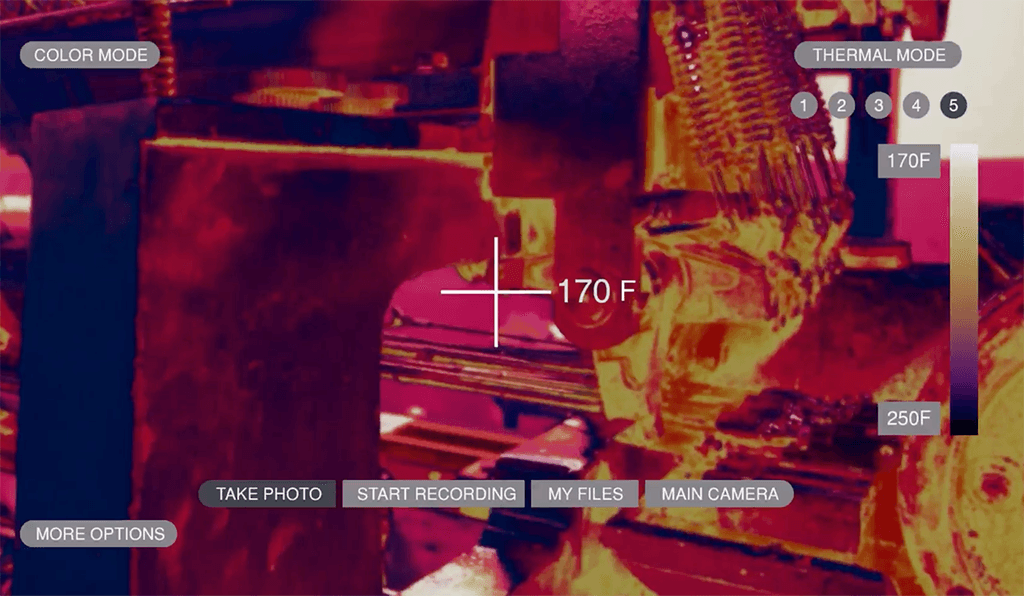
Many oven faults reveal themselves through temperature long before they cause a stoppage. Instead of reaching for a separate thermal camera, the engineer looks at the equipment, calls up the thermal view by voice, and captures the evidence on the spot.
- SensorFLIR thermal sensor with MSX — overlays visible detail onto the thermal image for sharper, easier-to-read scans.
- Range−20°C to 400°C measurement range — covers casings, flues, drives and panels on a typical bakery oven — paired with a 48MP visual camera.
- OutputRadiometric JPEG files — temperature data is retained in the image for later analysis, not just a flattened screenshot.
- RatingStandard module is not intrinsically safe. For classified hazardous areas, RealWear's Navigator Z1 with Thermal Camera is ATEX Zone 1 certified.
Every visit becomes a record
Capture the problem. Capture the repair. Capture the proof.
An oven service visit generates information worth keeping. Build a visual and thermal record around the work itself — useful for the customer, for the next engineer on site, and for maintenance and audit records.
Before
Capture the oven's starting condition, visually and thermally.
Inspect
Scan zones, casing, drives, flues and panels for abnormal readings.
Diagnose
Cross-reference against control-system data, instruments and history.
Repair
Work hands-free with manuals or a remote expert on-screen.
Verify
Re-scan once back at temperature to confirm the fault is resolved.
Report
Attach the evidence to customer, site, oven and visit automatically.
When the engineer needs a second opinion
Bring your most experienced oven engineer to every job
For oven manufacturers supporting installed equipment across the UK and overseas, and for bakery maintenance teams running around the clock, a remote expert can mean the difference between a short stop and a lost shift.
See it in action
A live expert, seeing exactly what your engineer sees
Navigator 520 works with Microsoft Teams, so the engineer at the oven can call a colleague or the manufacturer’s support team hands-free — and both see the same view in real time.
- Call and talk by voice command, no screen to tap
- The expert sees the oven from the engineer’s point of view
- Hands stay free for the job while the call runs
HARDI's technicians used Navigator 520 to support customers as far afield as Japan and South Africa remotely, resolving cases in roughly 90 minutes on average and avoiding an on-site dispatch that HARDI estimates at around €5,000 a trip.
RealWear press release, HARDI International.BMW deployed RealWear across 347 US centres and selected MINI dealers, with some repairs completed up to 75% faster once technicians could bring in remote support instead of waiting for a specialist to travel.
RealWear client case study, BMW of North America.From reactive to condition-based
Build a thermal history of every oven
Regular thermal inspection helps an engineer learn what "normal" looks like for a specific oven, zone by zone — so a change stands out well before it becomes an unplanned stoppage.
Planned shutdowns are short and valuable. Arriving with last visit's thermal images means the team knows where to look first, and the repairs that matter get done in the window available.
A repeatable planned-maintenance route
Heating zones
Casing & doors
Band drive & bearings
Fans & motors
Electrical panel
Flues & heat recovery
Same route, same order, every visit — so the images stack up into a comparison, not a one-off snapshot.
Technology is only useful if engineers use it
Why Metro, not just the box
Managed around your operation
Metro supports the complete solution around your engineers and their work challenges — from initial setup and deployment through to ongoing support, updates and day-to-day management.
Training that sticks
Voice commands and display positioning take a short adjustment period. We build that into rollout rather than leaving engineers to work it out alone.
Spares, batteries and support
Hot-swap batteries, chargers and device management handled as an ongoing service, not a one-off purchase — so the headset is ready for every shift.
Do more, hands free
Metro can help turn everyday oven inspections into simple digital workflows. Engineers capture information, images and findings while they work, with the data automatically structured into inspection records and reports. Less paperwork. Less manual data entry. More time on the equipment.
Getting started
Simple steps to get started
We’ll guide you through the process and take care of the technical setup.
Apply
Complete and sign the application form.
Share your details
Send us the technical information we need.
We configure
We configure the device around your requirements.
We deliver
We send the fully prepared device to you.
We train you
We provide practical training.
Go live
You’re ready to go.
The managed solution
Everything needed to put it to work, not just a headset
From £233 a month, subject to terms — when a production line is waiting on a fix, one faster diagnosis or one avoided specialist visit can cover the cost for that month outright.
- RealWear Navigator 520
- Thermal Camera Module
- Spare battery & charging dock
- Device & software configuration
- Engineer training & onboarding
- Ongoing device management & support
Talk to Metro
Tell us about your business
Leave a few details and we’ll get back to you to talk through your requirements and arrange a demonstration.
- No obligation, no hard sell — just a conversation about your engineers, your ovens and your sites.
- Prefer to speak to someone directly? Call +44 203 906 1400.
Ready when you are
See the heat. Find the fault.
Prove the fix. Keep baking.
Discover what RealWear from Metro could do for your ovens and your engineers.
Book a Demonstration · www.metrocomms.co.uk